Clone Phishing Response: Containment and Recovery Steps
The fastest way to secure your account is not changing your password, but invalidating the active session token that the attacker is currently using to bypass login controls.
Immediately log out of all devices to kill the active session. Change your password and enable multi-factor authentication. Notify your email provider and contacts who received the fraudulent message. Monitor financial accounts for unauthorized transactions. Review email forwarding rules to ensure no data is being silently exfiltrated.
Immediate Session Termination
When you realize a clone phishing attack has succeeded, the attacker likely already holds a valid session token. A session token is a digital key that proves you are logged in, allowing the system to remember your identity without asking for your password again. Changing your password does not automatically destroy this token in many systems.
Log out of every device where you are signed in. Most services offer a "log out of all sessions" or "active devices" option in the security settings. This forces the server to discard the stolen session token. Without that token, the attacker is kicked out, regardless of whether they still have your password. This step is more urgent than changing credentials because it cuts off their current access.
Check for unauthorized forwarding rules immediately. Clone phishers often add automatic forwarding rules to send copies of your incoming mail to an external address. These rules allow them to monitor your communications even after you change your password. Delete any rules you did not create. If you cannot find the settings, assume they are hidden and proceed to containment.
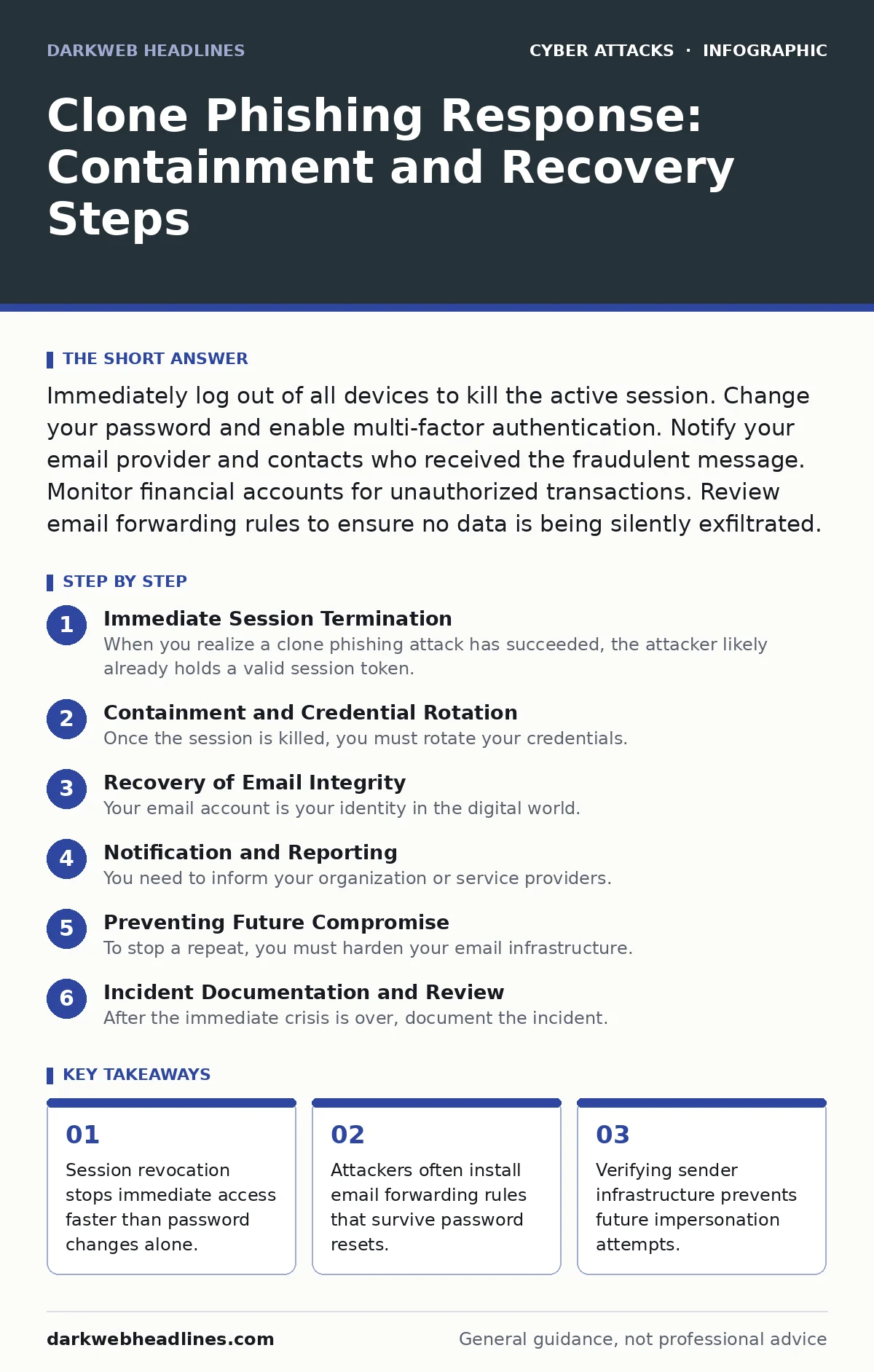
Containment and Credential Rotation
Once the session is killed, you must rotate your credentials. Rotation means generating new secrets to replace the old ones. Change your email password to a unique string that you have not used elsewhere. If you use a password manager, this is trivial. If you type manually, ensure the new password is long and random.
Enable multi-factor authentication if it is not already on. This adds a second layer of verification, such as a code from an app or a hardware key. This prevents future access even if the password is stolen again. Avoid SMS-based codes if possible, as they are vulnerable to SIM swapping.
Check for other compromised accounts. Attackers often harvest credentials from email signatures or previous replies. If you use the same password for banking, social media, or work, change those now. Use a breach notification service to see if your email appears in known data dumps. This helps you prioritize which accounts need immediate attention.
Review recent activity logs. Look for logins from unfamiliar locations or devices. Note the timestamps and IP addresses. This information is useful for forensic analysis and proving to support teams that unauthorized access occurred. Do not delete these logs. They serve as evidence of the intrusion timeline.
Recovery of Email Integrity
Your email account is your identity in the digital world. Restoring its integrity prevents further social engineering. Check the auto-responder settings. Attackers sometimes set up automatic replies to keep colleagues from noticing the silence while they harvest data. Disable any active auto-replies.
Examine the sent folder. Look for emails you did not write. These may have been sent to your contacts to spread the clone phishing campaign further. You must notify recipients of these messages. Tell them to delete the message and not click any links. This limits the blast radius of the attack.
Review your contact list for unknown entries. Some attacks involve adding malicious contacts to ensure the attacker can reach you easily later. Remove any contacts you do not recognize. Check your address book for entries that look like your own email address, which attackers use to bypass spam filters in future attacks.
Ensure your email signature is correct. Attackers may modify your signature to include malicious links or false contact information. Reset the signature to a known good state. Keep it simple. Avoid including phone numbers or direct links that could be exploited.
Notification and Reporting
You need to inform your organization or service providers. If this is a work account, contact your IT security team immediately. Provide them with the timeline, the affected accounts, and the evidence you gathered. They may need to reset group policies or block specific IPs.
For personal accounts, report the incident to the email provider. Use their official security portal, not the compromised inbox. Provide details about the clone phishing attempt. This helps them improve their filters and may assist in taking down the attacker’s infrastructure.
Notify your financial institutions if sensitive data was exposed. If the attacker accessed emails containing bank statements or verification codes, alert your banks. They can place fraud alerts on your accounts and monitor for unusual transactions. This step is critical if the attacker had access to multi-factor authentication codes via email.
Preventing Future Compromise
To stop a repeat, you must harden your email infrastructure. Implement DMARC, which stands for Domain-based Message Authentication, Reporting, and Conformance. DMARC tells receiving servers how to handle emails that fail authentication checks. It prevents attackers from successfully spoofing your domain.
Use secure email gateways if available. These tools scan incoming mail for malicious content and phishing indicators before it reaches your inbox. They provide an additional layer of defense that complements local security measures.
Educate yourself on the human factor in security. Technology cannot catch every social engineering attempt. You are the last line of defense. Learn to recognize the subtle differences in clone phishing emails, such as slight variations in sender addresses or urgent language.
Consider using passkeys for login. Passkeys are cryptographic credentials that are much harder to steal than passwords. They eliminate the risk of credential phishing because the key never leaves your device. This technology is becoming widely supported and offers superior protection against clone attacks.
See also: Business Logic Vulnerability Response: Recovery and Prevention Steps · Java Deserialization Response: Immediate Containment and Recovery Steps
Incident Documentation and Review
After the immediate crisis is over, document the incident. Write a summary of what happened, how it was detected, and how it was resolved. Identify the point of failure. Was it a lack of multi-factor authentication? A failure to notice a subtle sender difference?
Use this review to update your personal security checklist. Add steps that you missed during the panic. For example, if you forgot to check forwarding rules, make that a standard step in your response plan.
Share your experience anonymously with your community. Helping others recognize clone phishing patterns strengthens the collective defense. However, do not share sensitive details about your security setup or private data.
Regularly review your security settings. Accounts drift into insecure states over time. Check forwarding rules, connected apps, and recovery options quarterly. This habit ensures that your defenses remain effective against evolving threats.
Long-Term Hygiene Practices
Maintain a separation between personal and professional communications. Use different email addresses for different purposes. This limits the damage if one account is compromised.
Avoid storing sensitive information in email. Email is not a secure storage medium. Use encrypted file sharing services for sensitive documents. This reduces the value of the account to an attacker if it is breached.
Regularly update your software. Outdated clients may have vulnerabilities that attackers can exploit to install malware or steal credentials. Keep your operating system and email client patched.
Monitor your digital footprint. Use tools to check if your email address is listed on dark web marketplaces. Early detection of exposed credentials allows you to react before an attack occurs.
Key takeaways
- Session revocation stops immediate access faster than password changes alone.
- Attackers often install email forwarding rules that survive password resets.
- Verifying sender infrastructure prevents future impersonation attempts.
Frequently asked questions
Can I trust the "report phishing" button in my email client after a breach?
No. If your account is compromised, the attacker may intercept your reports. Use the provider's separate security portal or website to report the incident directly.
How long does a stolen session token remain valid?
It varies by provider, but tokens can remain active for days or weeks until the user logs out or the provider expires it. Never assume it expires quickly.
Should I delete the cloned phishing email immediately?
Yes, after you have saved any headers for forensic analysis. Deleting it reduces the risk of accidental clicks and removes the trigger for further automated attacks.
Does multi-factor authentication prevent clone phishing entirely?
No. MFA prevents account takeover if the attacker only has your password. It does not stop them from reading your emails if they already have a valid session token or if you approve a push notification.
How this guide was produced: written by the DarkWeb Headlines editorial team with AI assistance, checked against the public references listed below, and reviewed when the facts change. See our editorial policy or report an error.